软件名称:Adobe Audition 2025 v25.0 音频编辑软件
软件大小:WIN:748MB MAC:3.47GB
软件版本:WIN: v25.0 MAC: v25.0
软件语言:WIN:中文/英文 MAC:中文/英文
支持系统:Windows 10/11 MAC 12 至最新系统
下载方式:百度网盘下载 支持M芯片系列MAC电脑
安装教程:附带文本安装方法
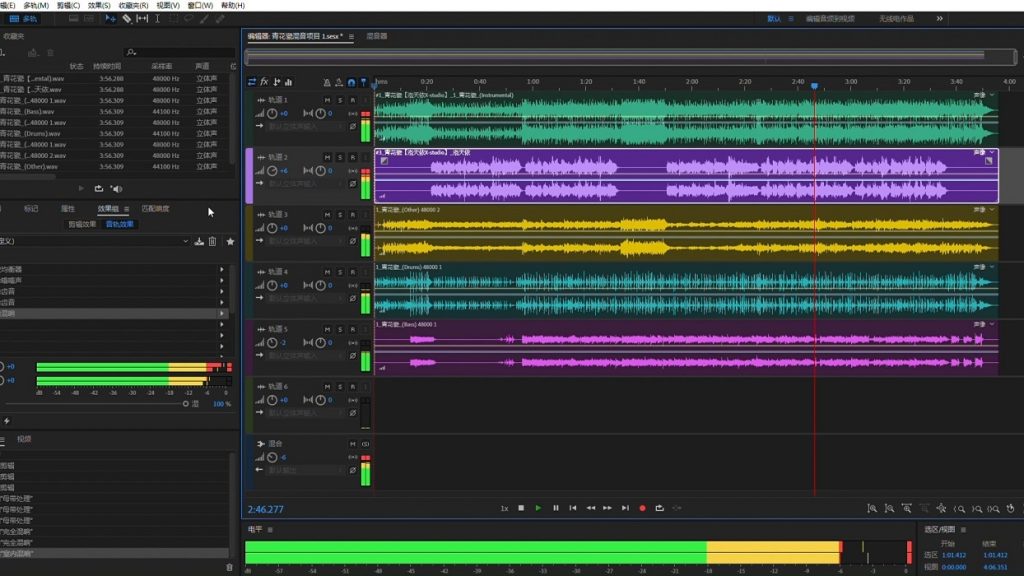
Adobe Audition。专业音频工作站。使用业界最佳的数字音频编辑软件创建、混合和设计音效。Audition 是一套全面的工具集,包括多轨、波形和频谱显示,可用于创建、混合、编辑和恢复音频内容。这款功能强大的音频工作站旨在加速视频制作工作流程和音频整理 — 并提供具有原始声音的精致混音。
编辑、混合、录制和恢复音频。Audition 是一套全面的工具集,包括多轨、波形和频谱显示,可用于创建、混合、编辑和恢复音频内容。这款功能强大的音频工作站旨在加速视频制作工作流程和音频整理 — 并提供具有原始声音的精致混音。
什么是 Audition?
了解业界最佳的音频清理、恢复和精确编辑工具,用于视频、播客和音效设计。
录制、编辑和集成音乐剪辑。
本分步教程将指导您了解强大的音频工具包 Adobe Audition,包括其与 Adobe Premiere Pro 的无缝工作流程。
应用程序中有新的交互式教程。
为您的音频增添魅力。使用 Essential Sound 面板实现专业品质的音频 — 即使您不是专业人士。
创建播客
了解为播客或任何其他音频项目录制、混合和导出音频内容的基本步骤。
重新混音以适应。
使用 Audition 中的 Remix 轻松自动地重新排列任何歌曲以适应任何时长。
修复和恢复
获取修复音频的最佳实践,包括如何使用频谱显示、诊断面板、效果等。
Adobe Audition. A professional audio workstation. Create, mix, and design sound effects with the industry’s best digital audio editing software. Audition is a comprehensive toolset that includes multitrack, waveform, and spectral display for creating, mixing, editing, and restoring audio content. This powerful audio workstation is designed to accelerate video production workflows and audio finishing — and deliver a polished mix with pristine sound.
Edit, mix, record, and restore audio.Audition is a comprehensive toolset that includes multitrack, waveform, and spectral display for creating, mixing, editing, and restoring audio content. This powerful audio workstation is designed to accelerate video production workflows and audio finishing — and deliver a polished mix with pristine sound.
What is Audition?
Meet the industry’s best audio cleanup, restoration, and precision editing tool for video, podcasting, and sound effect design.
Record, edit, and integrate music clips.
This step-by-step tutorial guides you through the robust audio toolkit that is Adobe Audition, including its seamless workflow with Adobe Premiere Pro.
New interactive tutorials, right in app.
Add oomph to your audio. Use the Essential Sound panel to achieve professional-quality audio — even if you’re not a professional.
Create a podcast
Learn the basic steps to record, mix, and export audio content for a podcast — or any other audio project..
Remix to fit.
Easily and automatically rearrange any song to fit any duration with Remix in Audition.
Repair and restore
Get best practices for fixing audio, including how to use the spectral frequency display, Diagnostics panel, effects, and more.

评论(0)