
软件名称:Steinberg SpectraLayers Pro 13 光谱层13中文版
软件大小:WIN:3.99GB MAC:3.99GB
软件版本:WIN:v13.0.10 MAC:v13.0.0
软件语言:WIN:中文/英文 MAC:中文/英文
支持系统:Windows 10/11 MAC 12 至最新系统
下载方式:百度网盘下载 支持M芯片系列MAC电脑
安装教程:附带文本安装方法
注意:
WIN系统,需要Windows 10 Version 21H2,或 Windows 11 Version 21H2 及以上的系统才能安装。
总之,不管你是WIN10,还是WIN11,需要 21H2 及以上的系统版本,才能安装。
MAC系统,需要macOS 12 及以上系统,才能安装 。
官方中文版,语言可以随意切换,喜欢用英文版的朋友,可以切换回英文版。
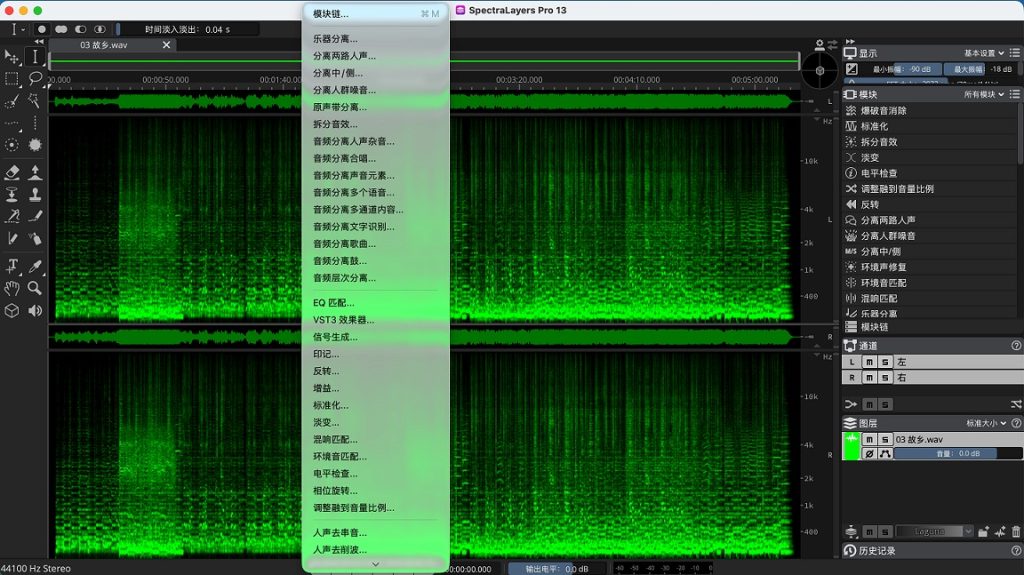
SpectraLayers 通过将声音作为视觉对象展示,赋予音频赋能。你可以探索、伸手、取用和改造,在修复和恢复音频到自由声音设计等各种任务中发挥奇迹。多年来开发的无与伦比的选择工具,如今又加入了新的人工智能驱动音频提取和修复工艺,使这成为迄今为止最重要的SpectraLayers版本。
人工智能。感官整合。
在光谱仪显示器上观看音频是一回事,但能够轻松触摸、雕刻和塑造所见内容的能力,正是SpectraLayers的独特之处。现在你拥有了一个技术娴熟、训练有素的AI伙伴,能够感知模式、执行操作,并加速你走向完美音频的道路。
AI增强处理
的基础 SpectraLayers中的手动选择工具支持从大笔编辑到显微干预的各种操作。AI辅助流程带来了更快的速度和精准度,使SpectraLayers工具组和基于图层的工作流程比以往更强大、更灵活。
从纯科学到自由即兴,
利用AI的速度和精准度将采样分割成层次,创造自由形式的混音。自动将轨道拆成音轨,将音轨拆成组成部分。快速识别、隔离并处理提取乐器的音色、瞬态和噪声特征。你做实验音乐吗?在SpectraLayers中,以外科手术般的精准获得颗粒和模具的声音。它是一个自由形式的音乐创作工具……真正的乐器。
修复和恢复
查找并删除错误和不需要的声音,减少噪点,修复剪辑,去除点击声,控制瞬态等等——使用SpectraLayers中的新AI辅助流程,无论是手动还是自动完成。以速度和精准度工作,享受你能以前所未有的方式定期抢救曲目和进行音频增强的满足感。
ARA时代
如今的音频制作平台需要同时在波形和频谱领域工作。工程师们想要的是强大的应用能力,同时具备提供最佳创意选项、可访问性和工作流程的灵活性。得益于先进的ARA 2技术,该技术旨在连接音频编辑应用,SpectraLayers可以在Nuendo、Cubase及其他开发者的众多应用程序中启动,直接在DAW时间轴上提供全面且无损的视觉编辑。
音频重制
使用高精度工具在频谱显示上进行超详细的音频选择。将这些材料提取到独立的层进行处理,无论是在SpectraLayers还是DAW生态系统的任何地方。混音和渲染,或者把你的编辑保留在DAW的时间线上。借助ARA 2的支持,你可以直接将SpectraLayers启动到Cubase/Nuendo波形显示窗口,实现终极的实时程序集成。
您的个人路径
SpectraLayers 提供 AI 辅助的频谱编辑功能和无缝的数字音频工作站(DAW)集成。入门级Elements版本可执行精确纠错,包含自动降噪和噪音消除处理,以及部分AI辅助处理,包括人声解混。专业版配备了更全面的工具和最先进的AI实现。如今,借助第二代AI和增强的ARA 2支持,SpectraLayers已成为独立的强大平台,也是Cubase和Nuendo的极佳扩展,将SpectraLayers的魔法直接带入了DAW时间线。
SpectraLayers delivers audio empowerment by showing sounds as visual objects. You can explore, reach in, take and transform, working wonders on tasks ranging from repairing and restoring audio to freeform sound design. Unmatched selection tools developed over many years are now joined by new artificial intelligence-driven audio extraction and repair processes, making this the most significant version of SpectraLayers yet.
Artificial Intelligence. Sensory Integration.
Looking at audio on a spectrograph display is one thing, but the ability to easily touch, sculpt and shape what you see is what sets SpectraLayers apart. And now you have a skilled, highly trained AI partner that can sense patterns, perform operations and speed you on your way to perfect audio.
A foundation for AI-enhanced processing
The manual selection tools in SpectraLayers allow everything from broad brush editing to microscopic intervention. AI-assisted processes bring even more speed and precision, making the SpectraLayers tool set and layers-based workflow more powerful and flexible than ever.
From pure science to free improvisation
Use AI speed and precision to split a sample into layers and create freeform mixes. Automatically unmix tracks into stems, and stems into component parts. Quickly identify, isolate, and work on the tone, transients and noise signatures of extracted instruments. Do you make experimental music? Get granular and mold sound with surgical precision in SpectraLayers. It’s a freeform music creation tool… a genuine musical instrument.
Repair and restore
Find and erase errors and unwanted sounds, reduce noise, repair clips, remove clicks, tame transients and much more — manually or automatically — with the new AI-assisted processes in SpectraLayers. Work with speed and precision, and enjoy the satisfaction as you routinely salvage tracks and perform audio enhancements in ways you never thought possible.
The ARA era
Today’s audio production platforms need to work in both the waveform and spectral domains. What engineers want is serious application power, coupled with the flexibility to deliver the best in creative options, accessibility and workflow. Thanks to advanced ARA 2 technology, which is designed to build bridges between audio editing applications, SpectraLayers can be launched inside Nuendo, Cubase and a host of applications from other developers to provide comprehensive, non-destructive visual editing right on the DAW timeline.
Audio refabrication
Use high-precision tools to make super-detailed audio selections on the spectral display. Extract this material to independent layers for processing, in SpectraLayers or anywhere in the DAW ecosystem. Mix and render, or keep your edits preserved on the DAW timeline. With ARA 2 support, you can launch SpectraLayers directly into the Cubase/Nuendo waveform display window for the ultimate in real-time program integration.
Your personal pathway
SpectraLayers delivers AI-assisted spectral editing capabilities and seamless DAW integration. The entry-level Elements edition can perform precise error correction and includes automatic noise and hum reduction processes, as well as selected AI-assisted processes including vocal unmixing. The Pro edition features more comprehensive tools, along with the most sophisticated AI implementation. Now with second-generation AI and enhanced ARA 2 support, SpectraLayers is a standalone powerhouse and a superb extension for Cubase and Nuendo, bringing SpectraLayers magic directly into the DAW timeline.
